Free Heureka "Verified by Customers" Integration with Shopify Flow 🚀

Adam Charvat
Adam Charvat
Heureka Verified by Customers for free with Shopify Flow

To integrate your store with "Verified by Customers" (Heureka.cz and Heureka.sk — the leading price-comparison and review platform in the Czech Republic and Slovakia), you can use apps available on the Shopify App Store. But if you use Flow, you can set up the process yourself.

Flow is an official Shopify app that is easy to use and lets you intuitively create and automate various processes.

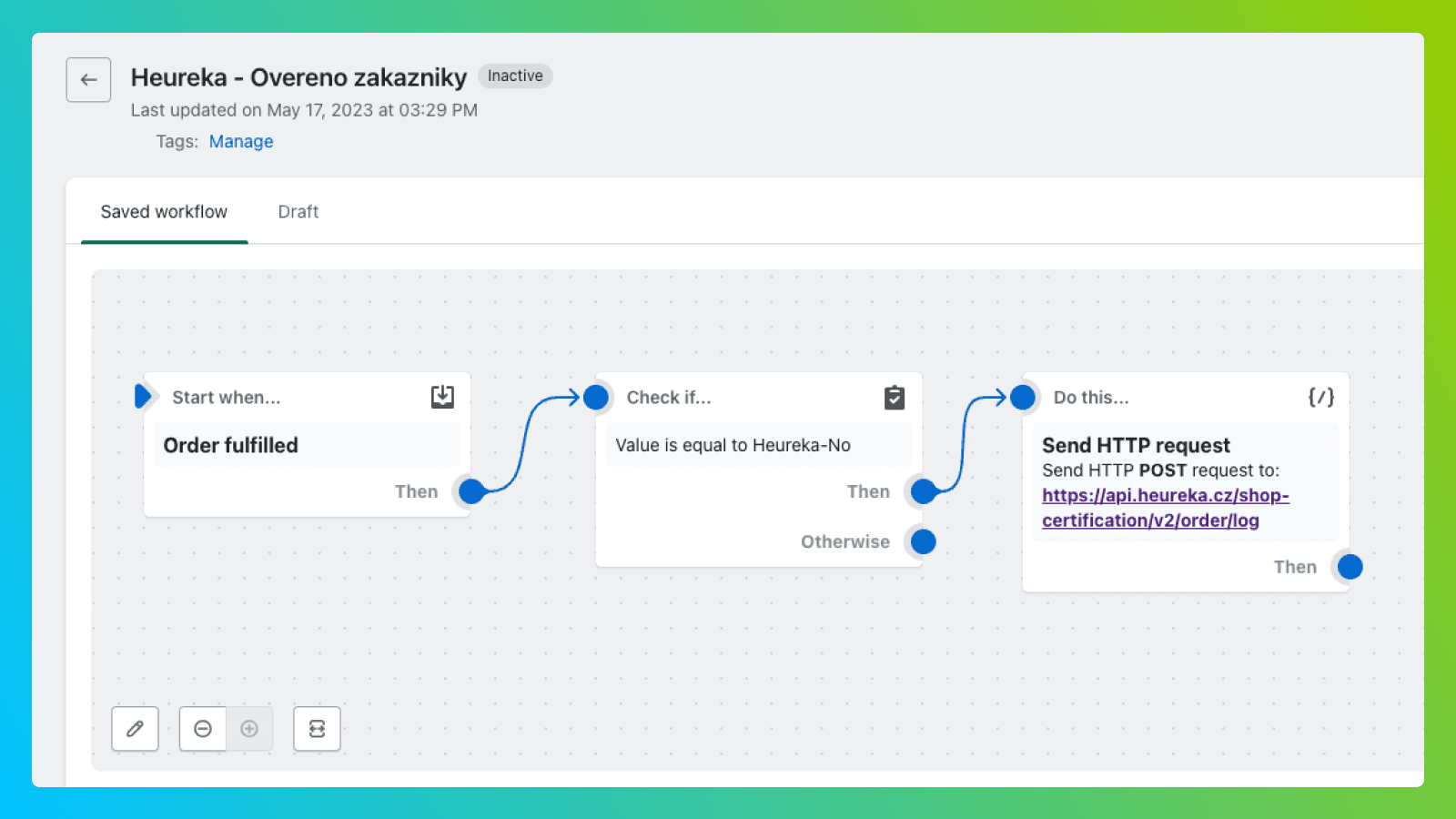
In this article we'll show a workflow that automatically sends data to Heureka after a completed purchase. A few days later, Heureka automatically emails the customer the "Verified by Customers" survey.

  • Czech Republic and Slovakia. Our workflow distinguishes Czech and Slovak purchases based on the delivery address.
  • Order data. Customer data and purchased products (their variant IDs) are automatically sent to Heureka. If you have an XML feed set up, the customer can also rate the products on your store.
  • Customer consent. By default, we assume the customer agrees to receive the survey, but we add an option in the cart where the customer can opt out.
  • API keys. Prepare the API keys from Heureka that you'll use to authorize your API requests. If you sell to both the Czech Republic and Slovakia, you'll prepare two different keys. You can find the secret key for the CZ Heureka here.

Setting up the workflow in the Flow app

  1. Download the workflow we created here, which you'll import into your store in the next step
  2. Install and open the Flow app in your store, then click the Import button
  3. Select the downloaded file and open the workflow
  4. In Flow, edit the actions named Send HTTP request. Replace YOUR API KEY with your actual keys.
  5. You can adjust or remove the conditions for the Czech Republic and Slovakia according to your needs.
  6. Activate the workflow
Edit the API key values in the Send HTTP Request actions

Adding a checkbox to the cart to opt out

You should give customers the option to opt out of the survey. You can achieve this by adding a checkbox code to your theme.

  1. Open the Online Store section and choose Edit code in your theme
  2. Find where the cart code is in your theme — usually it will be the file main-cart-items.liquid or cart.liquid
  3. Copy and paste the code below into your theme. The code must be inside the form tag.
  4. Test that you placed the code in the right spot. Make test orders; in the admin order detail you should see whether the customer checked the opt-out box.
  5. In the Flow app you can open the Run history and check whether the API request was sent.

On some themes you may run into an error. For more information about adding cart attributes to the cart, see the discussion here, or contact us.

1
2
3
4
5
6
<p className="cart-attribute__field" >
  <input type="hidden" name="attributes[Heureka-Dotaznik]" value="Heureka-Yes" />
  <input id="heureka" type="checkbox" name="attributes[Heureka-Dotaznik]" value="Heureka-No"{% if cart.attributes["Heureka-Dotaznik"] == "Heureka-No"
  %} checked{% endif %}>
  <label for="heureka">I do not agree to receiving the satisfaction survey as part of the "Verified by Customers" program, which helps improve services.</label>
</p>
Insert the code before the end of the form section
In the admin you'll see whether the customer agreed to the survey

Frequently Asked Questions

It is Heureka’s review program for the Czech and Slovak markets. After a purchase, Heureka emails the customer a satisfaction survey, and the resulting reviews build trust for your store on Heureka.cz and Heureka.sk.

No. You can set it up yourself for free using Shopify Flow, the official Shopify automation app, with the ready-made workflow provided in this article — no extra paid app required.

The workflow distinguishes Czech and Slovak purchases based on the delivery address and sends the data with the matching Heureka API key, so you can serve both Heureka.cz and Heureka.sk from one store.

Yes. You add a small checkbox to the cart so customers can decline the survey, and the workflow respects that choice when sending data to Heureka.

Interested in collaborating on a project?