How to Set Discounts for Card Payments Only on Shopify 💳
Learn how to create conditional discounts based on payment method in Shopify. Hide COD, target prepaid payments only, and control when discounts apply using Payflow.


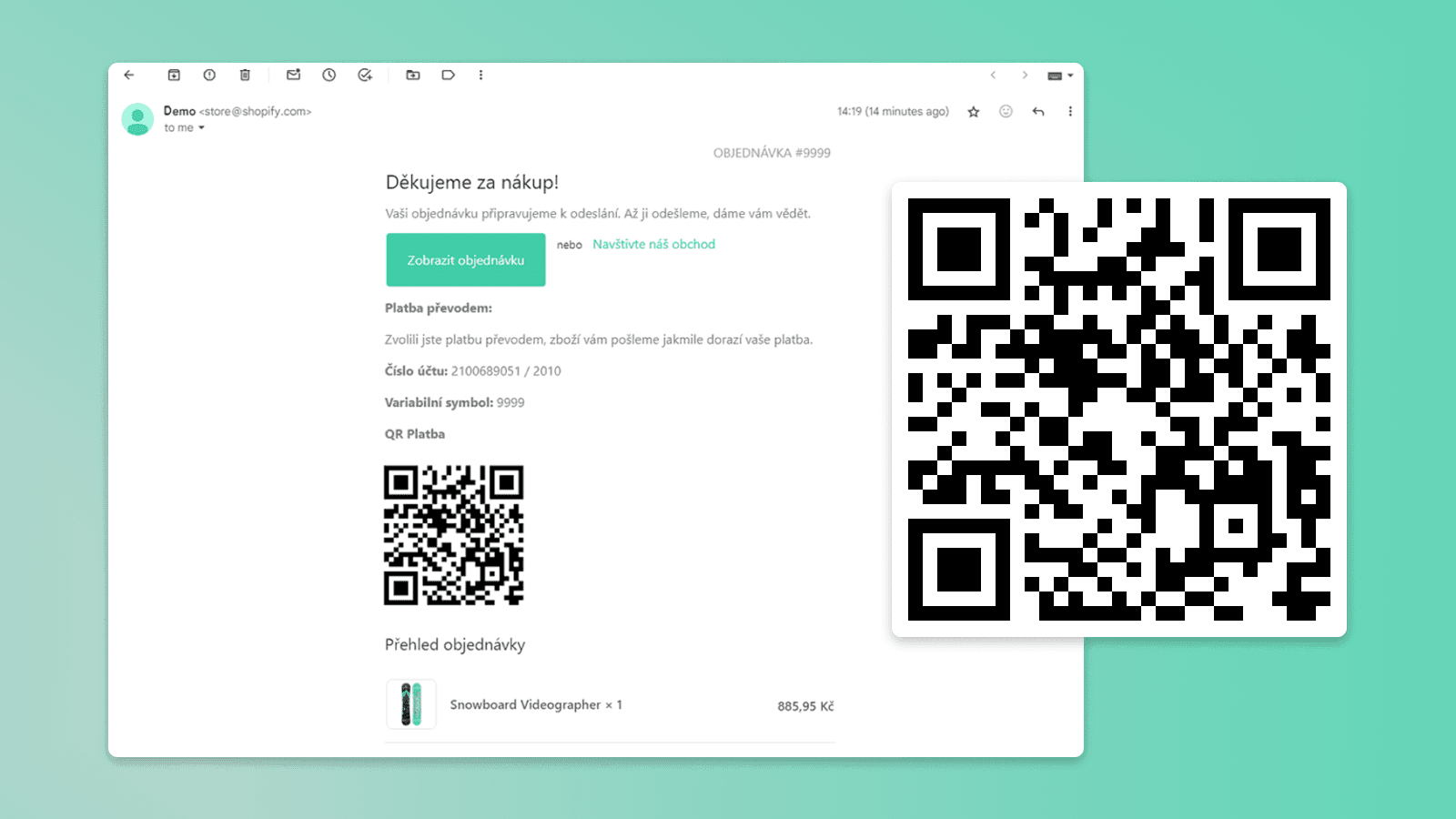
Let your Shopify customers pay invoices conveniently and easily using a QR code. These days, more and more customers prefer this transfer method because it eliminates the need to manually rewrite payment details. For merchants, this also reduces errors and increases the chance the order is paid immediately after it is created.
Note: QR payments via bank transfer are a standard primarily in the Czech and Slovak markets. This guide is intended for stores serving customers in the Czech Republic and Slovakia.
Looking for a quick overview? See our QR code payments on Shopify page.
In this article we'll show you how to easily integrate a QR code into the confirmation email. Once scanned, it automatically loads the order number as the variable symbol and pre-fills the account number and total order value for payment.
We'll show the specific procedure for two cases: bank accounts in the Czech Republic and in Slovakia. At the end, we'll also look at the option of adding a QR code directly to the thank-you page after an order is completed.
Prepare the following details:
Note: This code has been updated and now also supports Czech bank accounts with a prefix (e.g. 1234-7890123456/0100). That's why it looks a little different from the video tutorial below.
{% for transaction in transactions %}
{% if transaction.gateway == "Bank Deposit" %}
{% assign celkem = transaction.amount | divided_by: 100.00 %}
{% assign RAW_ACCOUNT = "XXXXXXXXXX" %}
{% assign BANK_CODE = "XXXX" %}
{% assign VS = order.name | remove_first: '#' %}
{%- assign account_parts = RAW_ACCOUNT | split: '-' -%}
{%- if account_parts.size == 2 -%}{% assign ACCOUNT_PREFIX = account_parts[0] %}{% assign ACCOUNT_NUMBER = account_parts[1] %}{%- else -%}{% assign ACCOUNT_PREFIX = "" %}{% assign ACCOUNT_NUMBER = account_parts[0] %}{%- endif -%}
<center>
<table class="container">
<tr>
<td>
<h3>Platební údaje</h3>
<p>Zvolili jste platbu bankovním převodem.Vaše objednávka bude odeslána po připsání peněz na náš účet.</p>
<p><strong>Částka:</strong> {{ transaction.amount | money }}</p>
<p><strong>Číslo účtu:</strong> {% if ACCOUNT_PREFIX != blank %}{{ ACCOUNT_PREFIX }}-{% endif %}{{ ACCOUNT_NUMBER }}/{{ BANK_CODE }}</p>
<p><strong>Variabilní symbol:</strong> {{ VS }}</p>
<p><strong>QR Platba</strong></p>
<p><img src="https://api.paylibo.com/paylibo/generator/czech/image?compress=false&size=150{% if ACCOUNT_PREFIX != blank %}&accountPrefix={{ ACCOUNT_PREFIX }}{% endif %}&accountNumber={{ ACCOUNT_NUMBER }}&bankCode={{ BANK_CODE }}&amount={{ celkem }}¤cy=CZK&vs={{ VS }}" alt="QR Platba"></p>
</td>
</tr>
</table>
</center>
{% endif %}
{% endfor %}{% for transaction in transactions %}
{% if transaction.gateway == "Bank Deposit" %}
{% assign celkem = transaction.amount | divided_by: 100.00 %}
{% assign ACCOUNT_IBAN = "SKXXXXXXXXXXXXXXXXXXXXXX" %}
<center>
<table class="container">
<tr>
<td>
<h3>Platobné údaje</h3>
<p>Zvolili ste platbu bankovým prevodom. Vaša objednávka bude odoslaná po pripísaní peňazí na náš účet.</p>
<p><strong>Čiastka: </strong>{{ transaction.amount | money }}</p>
<p><strong>IBAN: </strong>{{ ACCOUNT_IBAN }}</p>
<p><strong>Variabilný symbol: </strong>{{ order.name | remove_first: '#' }}</p>
<p><strong>QR Platba</strong></p>
<p><img src="https://api.QRGenerator.sk/by-square/pay/qr.png?iban={{ ACCOUNT_IBAN }}&amount={{ celkem }}¤cy=EUR&vs={{ order_name | remove_first: '#' }}&payment_note=QR PLATBA&size=128&transparent=false" alt="QR kod" /> </p>
</td>
</tr>
</table>
</center>
{% endif %}
{% endfor %}If you want to go even further and add a QR code not only to the email but also directly on the thank-you page after an order is completed, we have an even simpler solution for you. In our new article you'll find how to add a QR code to the thank-you page using the Payflow app in just a few minutes without editing any code.

QR bank-transfer payments are a standard in the Czech Republic and Slovakia. This guide covers Czech CZK accounts in the classic format and Slovak EUR accounts in IBAN format.
No. This method uses a Liquid snippet placed in the order confirmation email template, so no app is required. If you prefer a no-code option for the thank-you page, the Payflow app can add the QR code there instead.
The customer scans the QR code in their banking app, which automatically pre-fills the account number, amount, and order number as the variable symbol — no manual typing of payment details.
Yes. A separate guide shows how to add the QR code directly on the thank-you page using the Payflow app, in a few minutes and without editing any code.

Learn how to create conditional discounts based on payment method in Shopify. Hide COD, target prepaid payments only, and control when discounts apply using Payflow.

By adding a payment QR code, you let customers from the Czech Republic and Slovakia pay easily by transfer right after completing their order. Setup in the Payflow app is simple and can be done in just a few minutes.

Streamline your Shopify store with Mailstep thanks to automatic COD rounding, EUR COD processing for Slovakia, fixing faulty shipments, and the Globe app for pickup points.

Chargebacks can cause significant financial losses for online stores. In this article, we'll show you how to effectively minimize the risk of fraudulent transactions using the right payment settings and automation in Shopify Flow.
Interested in collaborating on a project?